
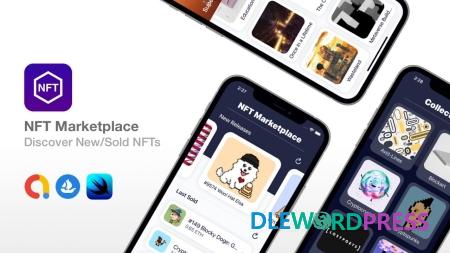
NFT Marketplace – SwiftUI + Widget – Discover New NFTs
Original price was: $119.00.$5.00Current price is: $5.00.
What is NFT? Well, in a few words, NFT (non-fungible token) is a unique unit of data stored on a digital ledger. NFTs can be used to represent items such as photos, videos, audio, and other types of digital files. Some NFTs were sold for over $60 million. This is a hot trend in 2021 and it’s only going to get bigger. There are not many iOS apps around NFTs, so you can be one of the early iOS developers to launch an NFT Marketplace app, having access to the largest database of NFTs via OpenSea APIs.
Download this and all other Plugins & Themes as a premium member for only $7.99
Join VIP Now !
Feature of NFT Marketplace – SwiftUI + Widget
- The app has a nice intro animation, that smoothly transitions to the main dashboard screen, where the logo animates indefinitely.
- The horizontal carousel in the app, shows the latest released NFTs on the OpenSea marketplace. The user can tap on an item, and the app will open Safari browser with the OpenSea NFT link.
- When the user taps the Create NFT button, they will be asked to choose a background image, which can be a solid color, gradient, abstract image provided by the app, or choose an image from their Photos library.
- After the user selects a background asset, they will navigate to the main NFT Creator (photo editor) screen, where they can use 4 tools: CoreML AI Photo Filters, Text Overlays with custom fonts, Image Overlays that the user can control the opacity only, and the Stickers that the user can control the size only.
- As the video illustrates, the user is able to double-tap on a text or sticker in order to remove it. There is no way for the user to edit existing text layers.
- The app supports only square images. Whenever the user applies a CoreML filter, the model will return the stylized image with 512×512 resolution. We are currently resizing the NFT image to 1000×1000 resolution before exporting it. You can adjust the resolution in the AppConfig file, however, you must be aware that resizing an image too much, will deteriorate its quality.
- The app has in-app purchases to allow users to unlock abstract background images, but with some additional coding, you can lock/unlock other items. In-App Purchases are handled via a private framework. This framework doesn’t support subscriptions. You can use this framework for any other games/apps that you want to add in-app purchases. You will not get the source code for the in-app purchase framework. If you want auto-renewable subscriptions, please contact us or search for ‘PurchaseKit by Apps4World’ in order to get the full version of the PurchaseKit product.
[wpsm_button color=”green” size=”big” link=#” icon=”download” class=”” border_radius=”10px” target=”_blank” rel=”nofollow”]Free Downloads[/wpsm_button] [wpsm_box type=”download” float=”none” text_align=”center”][sociallocker id=”155″]
- https://1fichier.com/?bye47486quksz6a8kjut
- https://anonfiles.com/ldl7t0K6x9/nftmarketplace-10.PHP.NULLED-DLEWP_zip
- https://bayfiles.com/hbl4tdK6x8/nftmarketplace-10.PHP.NULLED-DLEWP_zip
- https://www.mirrored.to/files/NHQR9WBH/nftmarketplace-10.PHP.NULLED-DLEWP.zip_links
- https://nitro.download/view/CEAD560C5F429F4/nftmarketplace-10.PHP.NULLED-DLEWP.zip
- https://rapidgator.net/file/964c3c500c6bd88f1ad7216a5185fe89/nftmarketplace-10.PHP.NULLED-DLEWP.zip.html
- https://turbobit.net/zirao4r3z6fs/nftmarketplace-10.PHP.NULLED-DLEWP.zip.html
- https://www.upload.ee/files/13918866/nftmarketplace-10.PHP.NULLED-DLEWP.zip.html
- https://uploadgig.com/file/download/d0E3441D07Fb9FEb/nftmarketplace-10.PHP.NULLED-DLEWP.zip
Password : www.dlewordpress.com
[/sociallocker][/wpsm_box]
[wpsm_button color=”gold” size=”big” link=”#” icon=”download” class=”” border_radius=”10px” target=”_blank” rel=”nofollow”]VIP Downloads[/wpsm_button]
Important Note
Unzip the file downloaded from our website before use. The zip file may include additional files like templates or documentation. Ensure you upload the correct file for installation.
How to Install Plugins
- Download the latest
.ZIPfile from DLEWordPress. - Log into your WordPress dashboard.
- Navigate to Plugins > Add New.
- Click Upload Plugin at the top.
- Select the plugin’s zip file.
- Click Install Now to complete the process.
How to Install Themes
- Download the latest
.ZIPfile from DLEWordPress. - Extract the zip file if required; ensure the main theme and child theme are accessible.
- Log into your WordPress dashboard.
- Go to Appearance > Themes.
- Click Add New, then Upload Theme.
- Select the theme’s zip file.
- Click Install Now to complete the installation.
Access Older Plugin/Theme Versions
Our website also hosts older versions of plugins and themes. You can use these to test compatibility with your website or roll back to a previous version in case of bugs or compatibility issues.
License Warnings
If the theme/plugin prompts for a license, you can safely ignore it. We provide pre-activated products using legal keys purchased for your use.
Updating to a New Version
When updates are available, you’ll find the latest versions in your My Account > Downloads section and for Membership customers Download files are available of product pages.
Fixing “Destination Already Exists” Error
- Delete the current version of the theme/plugin from your site before installing our premium version to avoid conflicts.
- Alternatively, install the Easy Theme and Plugin Upgrades plugin to resolve this issue effortlessly.
DLEWordPress ensures you have all the tools and support you need for seamless installations and updates!
For any installation or technical-related queries, Please contact via Live Chat or Support Ticket.Related products

Mobile App
Multi Vendor Grocery Android App with Backend v1.0.1 – Bigbasket Grofers Happyfresh Clone

Mobile App

Mobile App


Mobile App
Mobile App

Mobile App
