
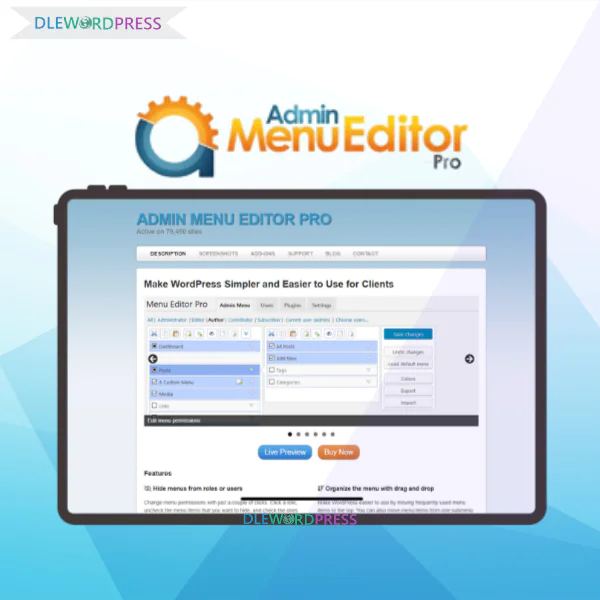
Admin Menu Editor Pro
Price range: $6.00 through $31.00
Admin Menu Editor Pro – Enhance WordPress admin experience with simple customization & role control.
Download this and all other Plugins & Themes as a premium member for only $7.99
Join VIP Now !
The WordPress dashboard acts as the central hub for managing your website. It provides a quick overview, allowing you to adjust and control various aspects of your site. However, the default setup may not always meet your specific customization needs. If you want to enhance your admin experience and make the dashboard more adaptable, Admin Menu Editor Pro is the solution you should consider.
What is Admin Menu Editor Pro?
Admin Menu Editor Pro is a robust plugin for WordPress that lets you fully customize the admin menu to suit your or your clients’ needs. It is particularly useful for managing user roles and permissions, ensuring that users only see the tools necessary for their tasks. By simplifying and optimizing the admin menu, this plugin improves user navigation and overall dashboard management, while also boosting security and efficiency.
Main Features of Admin Menu Editor Pro
When people talk about Admin Menu Editor Pro, the reason it’s often described as “worth every cent” isn’t just because of basic menu tweaks. The plugin packs a full suite of advanced functions designed to make WordPress management smoother, more intuitive, and way more secure. Let’s break it down and see why this plugin is considered an essential tool for any WordPress site owner.
1. Control Menu Visibility & Role Permissions

One of the strongest advantages of Admin Menu Editor Pro is its visibility control. WordPress roles like Administrator, Editor, Author, or Subscriber are quite rigid. This plugin allows you to define menu access per role, so each user only sees the items they actually need.
2. Simplify Menus with Drag & Drop
Once you’ve installed a handful of plugins, your Dashboard can quickly turn into a cluttered mess. With Admin Menu Editor Pro, you can easily clean things up using its drag-and-drop system:
- Pin “Posts” to the top for quick reach.
- Shuffle submenu items into different places.
- Create shortcut menus linking straight to your posts, pages, or plugins.
The outcome? A streamlined and beginner-friendly Dashboard — especially handy for clients who aren’t very tech-savvy.
3. Add Style with Icons & Colors
Beyond rearranging, this plugin helps you bring character to your Dashboard through icon and color adjustments:
- Pick from over 600 Dashicons & FontAwesome icons, or upload your own (PNG, GIF).
- Change background, text, icon, and hover colors for each menu item.
- Use unique colors for faster recognition and smoother navigation.
4. Build New Menus & Add Links
Admin Menu Editor Pro isn’t just about modifying existing items — it also lets you create brand new menus:
- Insert links to any URL, even third-party websites.
- Add posts/pages right into the menu for one-click access.
- Create “header” menus that serve as section dividers inside your Dashboard.
5. Open Menus in iFrame or Separate Tabs
Here’s a premium perk: you can load menus inside an iFrame right in the Dashboard or launch them in a new browser tab. This helps speed up workflows and reduces confusion when switching between tasks.
6. Import & Export Menu Layouts
Running multiple sites? This function is a lifesaver. Just export settings from site A and import them into site B. That way, your Dashboard stays consistent across projects — a huge time-saver for freelancers and agencies.
7. Hide Plugins & Safeguard Admin Accounts
With this plugin, you can hide plugins from the list to stop others from disabling or deleting them. Plus, you can lock down key admin accounts from unwanted changes. The benefit? Stronger site security and peace of mind when giving clients access.
8. Extra Tools: Branding & Toolbar Editor
The Pro package comes with two great extras:
- Branding: Swap out the WordPress logo, style the login page, hide update notices, and reinforce your brand identity.
- Toolbar Editor: Customize the Admin Bar — reorder, rename, add or remove menus, even add your own links.
These add-ons not only give you more control over menus but also deliver a professional, white-labeled WordPress experience.
Admin Menu Editor Pro Pricing
| Package | Price | Number of Sites | Included Add-ons | Updates |
| Package 1 Site | Only $6 / site | 1 Site | – | 1-Year Free Updates |
| Package 10 Sites | Only $31 / 10 sites | 10 Sites | – | 1-Year Free Updates |
Where to Get Admin Menu Editor Pro for Less?
Looking to grab the real Admin Menu Editor Pro without overpaying? Dlewordpress has you covered. We offer shared licenses at unbeatable rates:
- Package 1 site: only $6 / site
- Package 10 sites: only $31 / 10 sites
Compared with buying from the official vendor, you’ll save a ton while still enjoying the full Pro functionality. Every account is secure, reliable, and fully featured.
Why Purchase Admin Menu Editor Pro via Dlewordpress?
Our focus is on affordability and customer satisfaction. Here’s why Dlewordpress is the smart choice:
- Huge savings: Get Pro access for just a fraction of the usual cost.
- 100% licensed and safe: Our accounts are genuine and fully secure.
- Responsive support: Our team helps you with setup and troubleshooting anytime.
- Stable for the long run: Accounts are carefully managed to reduce errors and keep updates smooth.
Plenty of users have left positive feedback, making this a trusted, budget-friendly solution for WordPress site owners.
Steps to Buy Admin Menu Editor Pro at Dlewordpress
Purchasing is simple:
- Visit Dlewordpress: Head over to our site and look up Admin Menu Editor Pro.
- Pick your plan: Choose between the 1-site or 10-site deal.
- Make payment: Multiple fast and secure options are available.
- Instant delivery: Once confirmed, you’ll get your shared account details right away.
- Install & activate: Follow the provided guide to unlock Pro features.
How to Install Admin Menu Editor Pro
New Installation:
- Download the plugin (.zip file).
- Go to your WordPress dashboard and select Plugins -> Add New -> Upload. Choose the file and click “Install Now”.
- After installation, activate the plugin and input the license key.
- Access the plugin via Settings -> Menu Editor Pro to customize your dashboard.
Upgrading from Free Version:
- Deactivate the free version without deleting it to keep your settings.
- Install the Pro version following the steps above.
- The Pro version will automatically import the settings from the free version.
- Verify the settings in Settings -> Menu Editor Pro and uninstall the free version.
MultiSite Installation: For multisite setups, Admin Menu Editor Pro can be network activated or installed as a global plugin to manage the admin menu across all sites.
Requirements:
- WordPress 4.7 or higher
- PHP 5.6 or higher (7.4 recommended)
Pros
- Highly Customizable Admin Menu: Tailor the admin menu to your needs, making it simpler and more efficient.
- User Role Management: Assign specific menus to user roles, enhancing security and usability.
- Improved Security: Limit access to sensitive areas, reducing the chance of unauthorized changes.
- Enhanced Usability: Simplify the dashboard, making it easier to navigate, especially for non-technical users.
- Integration with iFrames: Display external content within the admin menu for a more versatile experience.
- Toolbar Customization: The optional Toolbar Editor lets you customize the WordPress Admin Bar for a smoother workflow.
- Time-Saving: Streamline the admin area to save time on daily management tasks.
Cons
- Potential Compatibility Issues: Modifications to core WordPress features may cause conflicts with other plugins or themes.
- Limited Access in Multisite: In multisite environments, only the “super admin” can access the menu editor, restricting control for other users.
Who is Admin Menu Editor Pro For?
- Web Developers and Agencies: Manage multiple client sites efficiently with customized admin experiences.
- Membership and E-Commerce Site Owners: Control user access and create a secure, focused environment.
- Content Managers and Editors: Organize the admin menu to streamline workflows and improve productivity.
- Security-Conscious Site Owners: Secure the site by restricting access to critical features.
FAQs about Admin Menu Editor Pro at Dlewordpress
- How do I manage WordPress menus with this plugin?
Install the plugin, go to Settings → Menu Editor Pro, then drag, rename, or hide items as needed.
- Can I hide certain menus for specific users?
Yes — under Access Permissions, simply choose the menu and assign it to roles. Done in seconds.
- Is it possible to create new menus?
Of course! You can add custom links, pages, posts, pick icons, and even open them in new tabs.
- How do I change icons and colors?
Click the menu item, choose your preferred icon and color — the Dashboard instantly updates.
- How does drag-and-drop reordering work?
The interface is visual — drag menus where you want them, and the plugin saves automatically.
- Does it support role-based permissions?
Yes. You can easily control visibility for Admins, Editors, Authors, Subscribers, and beyond.
- Can it be used with WordPress Multisite?
Definitely. It works smoothly across single or Multisite setups.
- How do I transfer settings between sites?
Just export the JSON file from one site and import it into another. Perfect for backups too.
- How many sites does one license cover?
Depends on your plan — either 1 site or 10 sites, based on what you purchase.
- Is the shared license secure?
Yes, completely secure. All access is managed safely to ensure stability.
- Can I upgrade from 1 site to 10 sites later?
Absolutely. Just reach out and we’ll upgrade you without affecting your settings.
- What if installation goes wrong?
You’ll get instant support via chat or email with full guidance.
- Will I still get updates?
Yes. All Dlewordpress accounts come with official plugin updates.
Conclusion
Take your WordPress management to the next level with Admin Menu Editor Pro. It provides comprehensive control over the admin dashboard, making it more secure, user-friendly, and tailored to your needs. Don’t miss the opportunity to get this plugin at a special price through DLEwordpress. Enhance your admin experience today!
| License | 1 site, 10 sites |
|---|
Important Note
Unzip the file downloaded from our website before use. The zip file may include additional files like templates or documentation. Ensure you upload the correct file for installation.
How to Install Plugins
- Download the latest
.ZIPfile from DLEWordPress. - Log into your WordPress dashboard.
- Navigate to Plugins > Add New.
- Click Upload Plugin at the top.
- Select the plugin’s zip file.
- Click Install Now to complete the process.
How to Install Themes
- Download the latest
.ZIPfile from DLEWordPress. - Extract the zip file if required; ensure the main theme and child theme are accessible.
- Log into your WordPress dashboard.
- Go to Appearance > Themes.
- Click Add New, then Upload Theme.
- Select the theme’s zip file.
- Click Install Now to complete the installation.
Access Older Plugin/Theme Versions
Our website also hosts older versions of plugins and themes. You can use these to test compatibility with your website or roll back to a previous version in case of bugs or compatibility issues.
License Warnings
If the theme/plugin prompts for a license, you can safely ignore it. We provide pre-activated products using legal keys purchased for your use.
Updating to a New Version
When updates are available, you’ll find the latest versions in your My Account > Downloads section and for Membership customers Download files are available of product pages.
Fixing “Destination Already Exists” Error
- Delete the current version of the theme/plugin from your site before installing our premium version to avoid conflicts.
- Alternatively, install the Easy Theme and Plugin Upgrades plugin to resolve this issue effortlessly.
DLEWordPress ensures you have all the tools and support you need for seamless installations and updates!
For any installation or technical-related queries, Please contact via Live Chat or Support Ticket.Related products

WordPress

WordPress

WordPress

WordPress
WordPress
WordPress
WordPress
WordPress